

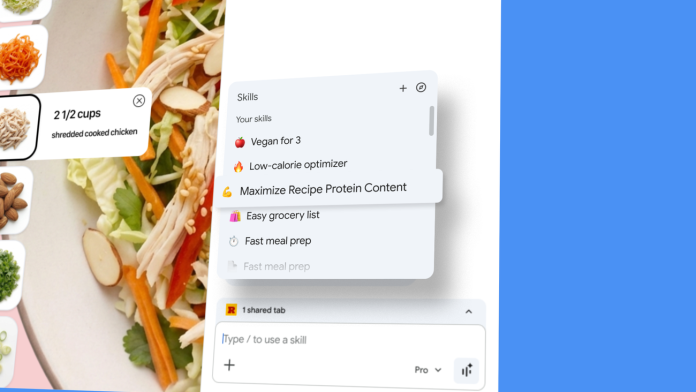
In an increasingly competitive digital landscape, small business owners are finding innovative ways to boost efficiency and productivity. A recent development from Google is set to transform how entrepreneurs navigate the web and leverage artificial intelligence. With the new "Skills in Chrome" feature, users can now save and reuse AI prompts, streamlining their workflow and enhancing overall performance.
The initiative comes as many professionals turn to AI for assistance in various tasks—the ability to answer questions, compare information, or clarify complex concepts is just the tip of the iceberg. Previously, repeating an AI task necessitated manually entering the same prompt for different pages, a process both time-consuming and cumbersome. With Skills in Chrome, this is no longer a hurdle. Users can save their most helpful AI prompts and execute them with just a click.
Business owners looking to optimize their work processes will appreciate the capability to create personalized workflows tailored to their specific needs. By saving prompts directly from their chat history, small business owners can efficiently manage repetitive tasks that are common in daily operations. Whether it’s generating reports or compiling customer data, these tools are designed to save time and reduce strain.
The implementation is seamless: when users need to access a saved Skill, they simply type a forward slash ( / ) or click a plus sign ( + ) in Chrome’s Gemini interface. This feature allows them to run the Skill on any page they are viewing, alongside any additional tabs they may have open. The flexibility to edit existing Skills or create new ones caters specifically to the dynamic nature of small businesses.
Adapting Skills in Chrome has already shown promising results in various sectors. Early testers have reported practical applications in health and wellness, shopping, and productivity. For instance, business owners in the health sector find immediate value in quickly calculating nutritional information for recipes, aiding in content creation or meal planning. In retail, generating side-by-side comparisons of product specifications across different tabs can facilitate informed purchasing decisions. Moreover, scanning lengthy documents for relevant details saves countless hours of sifting through text, enhancing productivity and focus.
However, as with any new technology, potential challenges accompany these benefits. Small business owners must consider the initial learning curve and training required for their teams to effectively utilize Skills in Chrome. Additionally, there may be periods of adjustment as businesses integrate this feature into their existing workflows. Ensuring that employees are comfortable with this new tool will be crucial for maximizing its benefits.
Moreover, with any AI-driven solution, there’s always a concern regarding data privacy. Business owners will need to navigate the balance between utilizing AI for efficiency and safeguarding sensitive company and customer information.
The introduction of Skills in Chrome showcases Google’s commitment to advancing AI capabilities. By simplifying how small businesses interact with technology, Google empowers entrepreneurs to work smarter, not harder. As AI continues to evolve, features like this could very well become industry standards, pushing small businesses toward more streamlined operations and enhanced productivity.
For small business owners eager to stay ahead of the curve, adopting Skills in Chrome could represent a significant leap forward. With the potential to customize workflows and significantly cut down on repetitive tasks, this tool positions entrepreneurs to focus on growth rather than getting bogged down in minutiae. As the digital landscape advances, proactive adaptation will remain a key driver of success.
For further information on this new feature, check out the original post here.
Image Via Chrome

