

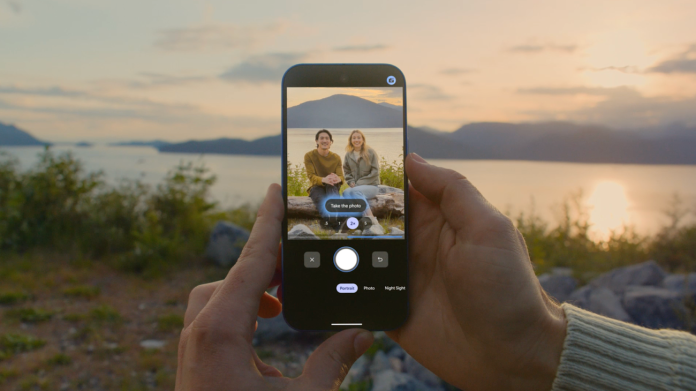
Small business owners often juggle multiple tasks, from managing operations to crafting engaging content for social media. A new tool from Google aims to streamline one of the most visually-driven aspects of business: photography. Enter Camera Coach, a real-time guide designed to help users take stunning photos—especially useful when capturing memorable group moments.
Camera Coach leverages Google’s advanced Gemini models to analyze your scene and provide instant feedback on vital photography elements. Whether you’re setting up a product display or snapping a group photo at a team event, this tool coaches users on framing, composition, lighting, and appropriate camera modes. With its step-by-step assistance, even novice photographers can elevate the quality of their images, making their marketing materials more visually appealing.
The implications for small business owners are significant. High-quality photos are crucial for attracting customers on social media platforms and enhancing websites. Small businesses often face the challenge of limited resources, and hiring professional photographers for every occasion can strain budgets. Camera Coach offers a cost-effective solution, enabling entrepreneurs to capture professional-grade images without the hefty price tag.
Hands-on photography has never been more accessible. As businesses strive to create engaging content, the ability to produce visually striking photos on-demand can improve brand visibility. Imagine a local restaurant using Camera Coach to photograph a new dish, or a boutique capturing the essence of a seasonal collection. Such high-quality images can help forge deeper connections with customers and create buzz online.
However, the implementation of such technology isn’t without challenges. For some small business owners, particularly those not as tech-savvy, the initial learning curve may be steep. Adapting to a new tool requires time and practice, and some may find the real-time coaching overwhelming at first. Additionally, while Camera Coach excels in helping users understand photography fundamentals, it may not replace the artistry that comes from professional photographers who can bring unique perspectives and creativity to a shoot.
A quote from Google emphasizes the tool’s benefits: “The more Camera Coach teaches you about these core photography fundamentals, the more equipped you’ll be to implement them on your own.” This sentiment reflects the tool’s aim to empower users, transforming them from passive consumers of content to active creators.
In an increasingly visual marketplace, the capacity to produce eye-catching content can enhance a business’s online presence. With Camera Coach, small business owners have the opportunity to hone their photography skills. This technology can be especially beneficial for those with limited marketing budgets, allowing businesses to stand out in a crowded digital environment.
Moreover, the learning aspect of Camera Coach means that business owners can leverage their growing skills over time. Engaging with the tool not only improves immediate photo quality but also builds long-term competencies—helping business owners craft images that resonate with their target audience.
As small business owners consider the complexity of digital marketing, integrating tools like Camera Coach into their toolkit can provide them with significant advantages. Photos are often the first element of engagement for potential customers, making immediate access to quality photography techniques invaluable.
Ultimately, the rise of tools like Camera Coach represents a shift toward democratizing photography skills, offering small business owners the chance to elevate their brand visually without necessitating a large investment in professional services. For more information about this new feature, you can read the full details in the original post here: Google Blog.
Image Via Google Pixel

